

 Shawn Peterson·Jan 29, 2026, 6:11:02 PM
When CEOs search “how much does HubSpot CRM cost,” they’re usually looking for a number.
What they find instead is a pricing page that looks simple on the surface and vague the moment you try to apply it to a real business. Free. Starter. Professional. Enterprise. Monthly rates. Per-seat pricing.
On paper, it feels straightforward. In practice, HubSpot CRM cost depends on far more than the base plan. The total investment is shaped by which hubs you use, how many seats you need, whether those seats are Professional or Enterprise, and how the system is actually deployed across sales, marketing, and operations.
That’s why so many teams feel surprised six to twelve months in. Not because HubSpot changed the price, but because the original estimate never reflected how the company would really use the platform.
This article doesn’t try to sell you HubSpot or talk you out of it. As HubSpot experts and a top sales enablement agency, we break down what actually drives cost so you can evaluate the investment the way a CEO should: in context, with eyes open, and without relying on pricing pages alone.
TL;DR: Quick Answers About HubSpot CRM Cost
How much does HubSpot CRM cost per month?
HubSpot CRM ranges from free to enterprise pricing, but most growing companies pay for multiple hubs and seats. Real-world costs depend on usage, team size, and required functionality.
Is HubSpot CRM really free?
The free version works for basic contact management, but most companies outgrow it quickly once they need automation, reporting, or multiple teams working in the system.
What drives HubSpot CRM cost the most?
The biggest cost drivers are hub level (Professional vs Enterprise), number and type of paid seats, and how many hubs you add beyond CRM, such as Marketing, Sales, Service, or Ops.
Do most companies need more than one hub?
Yes. As soon as sales, marketing, and operations need to work from the same data, additional hubs become necessary, which significantly changes the total cost.
Is HubSpot worth the cost for CEOs?
HubSpot is worth the investment when it’s designed as a revenue system, not just a CRM database. When poorly implemented, it feels expensive without delivering leverage.
1. HubSpot CRM Pricing Tiers (What the Website Shows You)
HubSpot’s pricing page presents four core levels: Free, Starter, Professional, and Enterprise.
At a glance, these tiers appear to answer the cost question. In reality, they only describe the entry point to the platform. Each tier is designed for a different stage of operational maturity, not a different total cost ceiling.
The free version is meant for basic contact tracking and deal visibility. Starter adds light automation and removes branding limitations. Professional introduces real automation, reporting, and forecasting capabilities. Enterprise layers on governance, permissions, advanced analytics, and deeper control.
What’s easy to miss is that these tiers apply independently across different hubs. You don’t buy “HubSpot CRM” once. You choose levels for Sales Hub, Marketing Hub, Service Hub, and Ops Hub separately, often at different times.
That’s why two companies on “HubSpot Professional” can be paying wildly different amounts. The tier label alone doesn’t tell you how many hubs are active, how many seats are paid, or how deeply the platform is embedded into daily operations.
The pricing page shows you the framework. The real cost shows up when you start using HubSpot the way growing companies actually do.
2. The Three Variables That Actually Determine HubSpot CRM Cost
When executives feel surprised by HubSpot pricing, it’s usually because they focused on the tier and missed the variables underneath it.
HubSpot CRM cost is driven by three forces working together. Ignore any one of them, and your budget stops being predictive.
The first variable is hub level. Sales Hub Professional and Sales Hub Enterprise are not just different price points. They are different operating models. Professional works when teams are relatively simple and decisions are decentralized. Enterprise introduces permissions, forecasting controls, and governance that larger or more complex revenue organizations eventually need. That jump alone can meaningfully change annual spend.
The second variable is seat count and seat type. Paid seats are not interchangeable. A Sales Hub Enterprise seat costs more than a Sales Hub Professional seat, and seat creep is inevitable as teams grow. New reps, managers, RevOps, and leadership all end up needing access. What starts as a small number compounds quietly over time.
The third variable is hub expansion. Very few companies run HubSpot with only one hub for long. Sales teams need marketing data. Operations teams need automation and data sync. Service teams need visibility post-close. Each additional hub adds cost, but more importantly, it changes how deeply HubSpot becomes embedded into the business.
This is why “How much does HubSpot CRM cost?” never has a single honest answer. The platform price is predictable. The way organizations grow into it is not, unless it’s planned intentionally.
3. Sales Hub Pricing in Practice: Professional vs Enterprise
Sales Hub is where most cost conversations start, and where most misunderstandings happen.
Sales Hub Professional is built for teams that need automation, pipeline visibility, and basic forecasting without heavy governance. It works well for smaller sales teams, founder-led motions, or organizations early in their revenue maturity.
Sales Hub Enterprise is designed for a different reality. It assumes multiple teams, layered approvals, forecasting rigor, and the need to control how data flows through the pipeline. It’s not just more expensive. It’s more opinionated.
The decision between Pro and Enterprise usually isn’t about today’s needs. It’s about whether leadership wants the CRM to enforce consistency or simply reflect activity. Many teams start on Professional, then upgrade once forecasting breaks down or accountability becomes hard to maintain.
From a cost perspective, the shift matters because Enterprise pricing applies per seat. As more stakeholders require access, the monthly number scales faster than most early models anticipate.
This is where CEOs often feel friction. The software didn’t suddenly get expensive. The organization simply reached a point where control, visibility, and predictability mattered more than minimal spend.
The Q2 Perspective
One of the most common issues we see in Q2 engagements is that companies evaluate HubSpot pricing before they’ve defined how revenue is supposed to move through the business.
When the sales motion, ownership model, and expansion paths aren’t clear, HubSpot gets layered on reactively. New hubs are added to fix problems. Seats are added to unblock teams. Costs rise without a corresponding increase in leverage.
Q2 helps leadership teams map the go-to-market system first, then align HubSpot configuration and investment to that design. The goal isn’t to spend less at all costs. It’s to spend intentionally, with predictability and return.
Want to see how high-performing teams use HUbSpot to scale business?
4. How Adding Marketing, Service, and Ops Hubs Changes the Cost Curve
Most HubSpot CRM budgets break when additional hubs enter the picture.
Marketing Hub is often the first addition. As soon as demand generation, attribution, or lifecycle tracking matters, CRM alone isn’t enough. Marketing Hub introduces contact tiers, automation limits, and reporting depth that directly affect cost as databases grow.
Ops Hub usually follows. Data sync, automation across objects, and operational visibility become necessary once sales and marketing are no longer operating independently. Ops Hub doesn’t feel flashy, but it quietly becomes one of the most critical.
5. What HubSpot CRM Costs in the Real World
Once HubSpot is in active use, cost stops being theoretical and starts reflecting how the business actually operates.
For smaller teams, HubSpot often begins as a focused sales tool. A handful of Sales Hub Professional seats, limited automation, and light reporting keep costs manageable. At this stage, the platform feels affordable because complexity is still low.
As the organization grows, costs change shape. Additional sales seats are added. Leadership wants better forecasting. Marketing needs attribution. Operations needs automation and data consistency. What began as a CRM turns into a revenue platform, and the investment grows with it.
In more mature organizations, HubSpot spans multiple teams and hubs. Sales, marketing, service, and RevOps all depend on it. Costs increase, but so does leverage. Automation replaces manual work. Visibility replaces guesswork. Decisions move faster because the system reflects reality.
This is where many CEOs misjudge value. They compare today’s HubSpot bill to yesterday’s CRM spend instead of comparing it to the headcount, tools, and inefficiencies it replaces.
In the real world, HubSpot costs scale with ambition. The question isn’t whether the number goes up. It’s whether the return scales with it.
6. HubSpot List Pricing (So You Can Actually Budget)
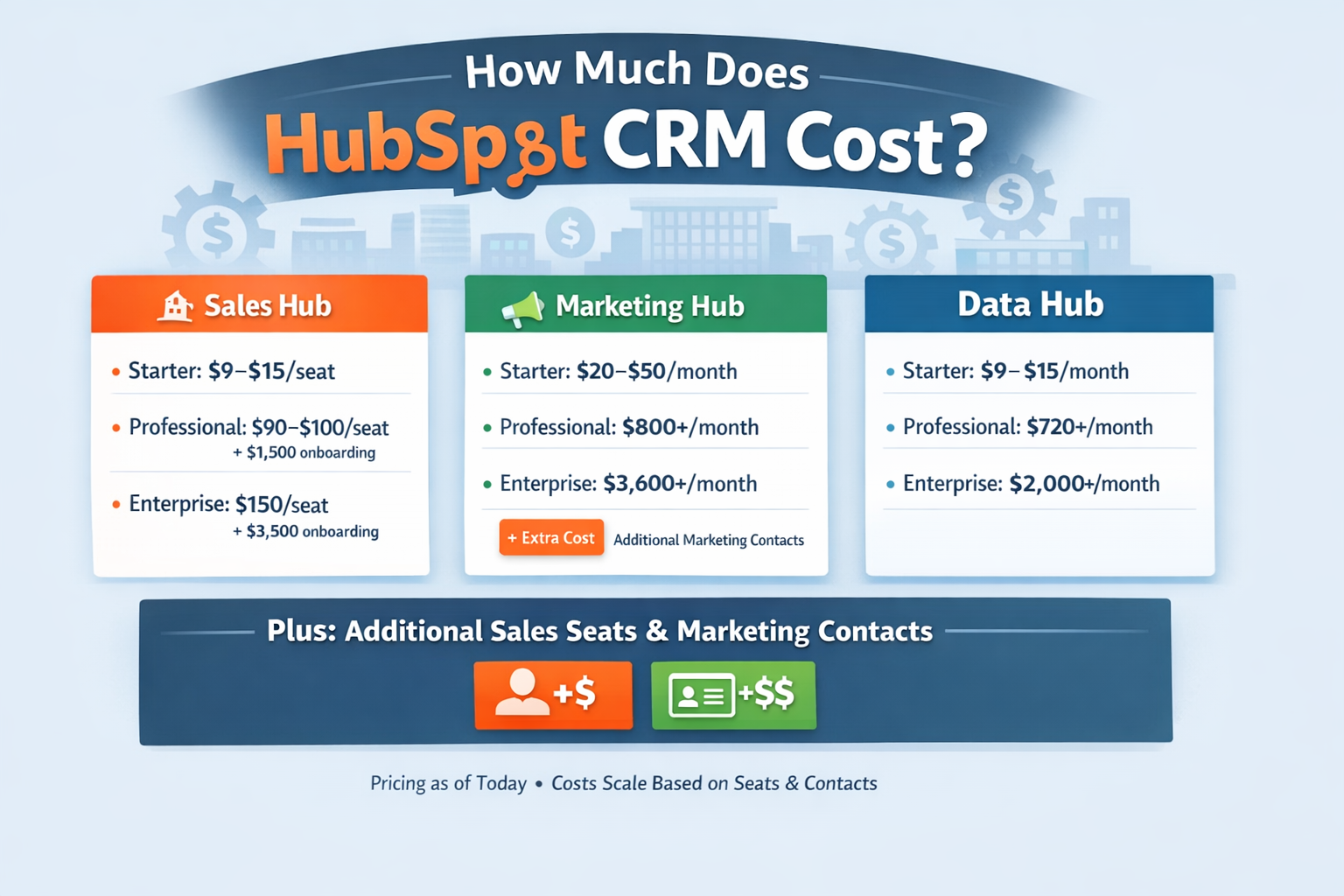
HubSpot pricing gets confusing because it’s not “one CRM price.” It’s a mix of Hubs, tiers, seat types, and (for Marketing) marketing contacts. So before we get into real-world totals, here are the baseline list prices you’ll see most often.
Sales Hub (per seat)
Starter: $9/seat/month (annual) or $15/seat/month (monthly)
Professional: $90/seat/month (annual) or $100/seat/month (monthly) + $1,500 onboarding
Enterprise: $150/seat/month (annual) + $3,500 onboarding
Marketing Hub (base + contacts)
Starter: $9/seat/month (annual) or $15/seat/month (monthly) and includes 1,000 marketing contacts
Professional: $800/month (annual) or $890/month (monthly) + $3,000 onboarding and includes 3 core seats + 2,000 marketing contacts
Enterprise: $3,600/month + $7,000 onboarding and includes 5 core seats + 10,000 marketing contacts
Important: Marketing costs scale with contacts. Once you exceed the included marketing contacts, you move into the next contact tier automatically. Example: going from 2,000 to 2,001 contacts can bump you into the 5,000 tier (roughly +$250/month, depending on your contract).
Data Hub (formerly Operations Hub)
Starter: $9/seat/month (annual) or $15/seat/month (monthly)
Professional: $720/seat/month (annual) or $800/seat/month (monthly) (includes 1 core seat; additional core seats start at ~$45/month)
Enterprise: $2,000/month (includes 1 core seat; additional core seats start at ~$75/month)
This is the part most teams miss: Sales scales by seats, Marketing scales by seats + marketing contacts, and the moment you add multiple hubs at higher tiers, HubSpot stops being a “CRM line item” and becomes a real platform budget.
7. When HubSpot Feels “Too Expensive”
HubSpot almost always feels expensive for the same reason.
It’s not because the software is overpriced. It’s because the system was never designed to do the work it’s now being asked to do.
This usually shows up when HubSpot is implemented as a database instead of a revenue system. Teams pay for automation they don’t use. Leadership pays for reporting they don’t trust. Seats are added to solve problems that should have been solved with process.
Another common issue is reactive expansion. A problem emerges, so a new hub is added. A bottleneck appears, so more seats are purchased. Over time, the platform grows without a unifying design. Costs rise, but leverage doesn’t.
From the outside, it looks like HubSpot “got expensive.” In reality, the organization outgrew its original setup without ever rethinking how the system should function.
When HubSpot lacks clear ownership, usually at the RevOps level, pricing pain is almost guaranteed. Without someone responsible for alignment, governance, and optimization, spend increases while outcomes stay flat.
That’s when frustration sets in. Not because HubSpot can’t deliver value, but because it’s being asked to perform without a plan.
8. When HubSpot Is Worth the Investment
HubSpot is worth the investment when it’s treated as infrastructure, not software.
In organizations where revenue motion is clearly defined, HubSpot becomes a force multiplier. Sales stages reflect reality. Automation removes friction. Data supports decisions instead of creating debate.
The most effective teams don’t measure HubSpot by its monthly cost. They measure it by what it replaces. Fewer tools. Fewer manual processes. Fewer surprises in forecasting. Fewer deals lost to inattention.
For CEOs, this is where the conversation changes. HubSpot stops being a line item and starts being an operating system. The platform enforces discipline without micromanagement. It creates consistency without slowing teams down.
At that point, cost becomes predictable. Growth becomes intentional. Scaling no longer requires heroics.
That’s when HubSpot earns its keep. Not because it’s cheap, but because it creates leverage that compounds as the business grows.
9. How CEOs Should Evaluate HubSpot CRM Cost Before Buying
For CEOs, the biggest mistake isn’t choosing the wrong CRM. It’s evaluating CRM cost in isolation.
HubSpot pricing only makes sense when it’s tied to how revenue actually moves through your business. That means stepping back from tiers and seats and asking harder questions about process, ownership, and scale.
Start with clarity around your sales motion. How do deals really progress? Where do they stall? What information does leadership need to see risk early? If the CRM can’t enforce those answers, cost will rise without control.
Next, look at ownership. Someone needs to be accountable for CRM outcomes, not just administration. Without RevOps ownership, HubSpot becomes reactive. With it, the platform becomes predictable.
Finally, evaluate HubSpot as infrastructure. The right question isn’t “What does this cost today?” It’s “What does this replace, and what does it allow us to scale without adding headcount?”
When CEOs frame the decision this way, pricing conversations become strategic instead of emotional.
FAQ: HubSpot CRM Cost
Is HubSpot CRM really free?
HubSpot offers a free CRM tier, but it’s designed for basic contact and deal tracking. Most companies outgrow it quickly once automation, reporting, or multi-team coordination becomes necessary.
Why does HubSpot get expensive over time?
Costs increase as companies add paid seats, upgrade hub levels, and expand into Marketing, Service, or Ops hubs. This usually reflects business growth, not unexpected price changes.
How many HubSpot seats do most companies actually need?
Beyond sales reps, managers, RevOps, and leadership often require access. Seat count tends to grow steadily as forecasting, reporting, and governance become more important.
Do we need Sales Hub Enterprise or is Professional enough?
Professional works for simpler sales motions. Enterprise becomes necessary when teams need stronger permissions, forecasting controls, and consistent enforcement of process across larger or more complex organizations.
Do most companies end up using more than one hub?
Yes. As soon as sales, marketing, and operations need shared data and automation, additional hubs become part of the equation. CRM-only setups are rare long term.
Can HubSpot replace other tools?
In many cases, yes. HubSpot can consolidate CRM, marketing automation, service workflows, and reporting into a single system, reducing tool sprawl and operational friction.
Is HubSpot worth the cost for CEOs?
HubSpot is worth the investment when it’s implemented as a revenue system, not a database. When aligned to how the business sells and grows, the platform creates leverage that compounds over time.
No call required
Tell us what is not working in your portal
Describe the problem in a line or two and we will reply with an honest read on what is causing it and what we would fix first. If the answer is that you do not need us, we will say that.