

Start here
Overview
In short
- Start with the warmest lists, your own clients and past opportunities, before net-new prospects.
- Measure the six C's: calls, connections, conversations, conversions, closes and capturing data.
- Open with a short, honest Breakthrough message, and handle objections with a prepared response matrix.
- Log every call with its true disposition, and keep lead statuses from dropping people off call lists.
- Never end a call or meeting without a dated next step, and work no-shows first.
This playbook is designed to equip you with the best practices for achieving success with Quantum's Sales Blitz as a Service. To attain the most optimal outcomes and extract maximum ROI, the effectiveness of this program is hinged upon careful planning and enthusiastic participation from all involved parties.
Effective outbound lead generation revolves around a solid lead list, a compelling message, and skillful delivery. Errors in any of these critical areas can lead to suboptimal results, undermining the potential success of the program.
First Blitz Preparation
Our objective is to kickstart the program with a resounding success during the initial blitz, creating a wave of enthusiasm and fostering active engagement from your team members. This sets the tone for the entire endeavor and fuels momentum for future initiatives
Chapter 1
6 C's of Sales
Six measures that show where your pipeline is leaking, and what to coach.
The 6 C’s of Sales
A Data-Driven Framework for Building Consistent Pipeline
Calls: Activity at the Top of the Funnel
- Measure daily/weekly call volume to gauge rep productivity
- Key Metrics: Total dials, talk time per rep
- Purpose: Fill the top of the funnel and establish rep rhythm
- Coaching Tips: Set dial goals, address time blocking discipline
Connections: Are We Reaching People?
- Measure effectiveness of dialing tools and list quality
- Key Metrics: Connection rate, time to first connect
- Purpose: Diagnose list, script, or tool issues
- Coaching Tips: Optimize timing, list sources, and scripting
Conversations: Are We Talking to the Right People?
- Focus on right-party contacts and decisionmaker conversations
- Key Metrics: Conversation length, qualified discovery calls
- Purpose: Improve targeting and gatekeeper navigation
- Coaching Tips: Train on permission-based openers, roleplays
Conversions: Are We Creating Next Steps?
- Track ability to move conversations into sales motion
- Key Metrics: Meeting rate, lead hand-off velocity
- Purpose: Identify strengths/weaknesses in positioning
- Coaching Tips: Reinforce objection handling and CTAs
Closes: Are We Driving Revenue?
- Measure the effectiveness of the entire sales cycle
- Key Metrics: Close rate, revenue per meeting
- Purpose: Understand hand-off quality and follow-through
- Coaching Tips: Analyze AE feedback, use call recordings
Capturing Data: Build a Flywheel, Not a Silo
- Enable continuous learning and system improvements
- Key Metrics: CRM hygiene, activity tracking, stage duration
- Purpose: Drive insight-based coaching and decisions
- Coaching Tips: Leverage automation, set CRM standards
Bringing It All Together
- Each C builds on the last to optimize your sales engine
- Use this framework for onboarding, reviews, and dashboards
- Let data lead, but let coaching drive performance
- Call to Action: Implement this across tools like HubSpot or Salesforce
Chapter 2
Targets and Lists
Where your best calls come from: the right lists, in the right order.
Lead Lists
An accurate lead list is the bedrock of a successful outbound call campaign. It empowers your team to engage with the right prospects, deliver personalized messages, and drive positive business outcomes.
Data Sources
We strongly advise integrating warm leads into your call campaign strategy. These warm leads encompass prospects you've already engaged with through marketing efforts or previous calls. This category can also extend to existing customers who are ripe for upselling.
Our RevEfficiency model operates on a fundamental principle: prioritize optimizing opportunities within your existing customer base and the leads in closest proximity. It's about capitalizing on the potential within familiar territory before venturing into new waters. The overarching objective is revenue maximization, focusing efforts on prospects with higher odds of conversion, rather than expending resources on colder leads with lower chances of success.
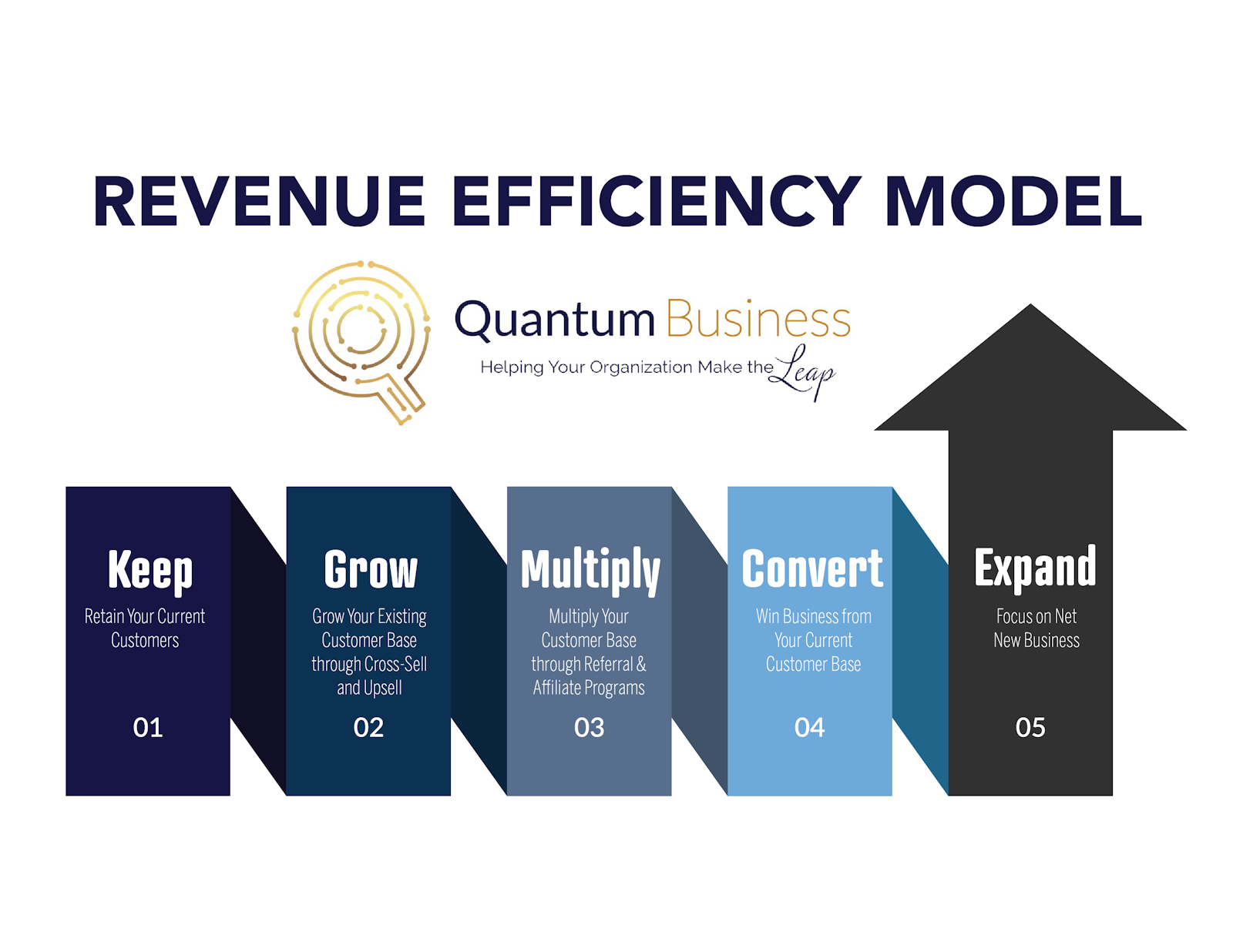
When it comes net new lead lists, we'd like to understand whether you'll be supplying the net new leads or if Quantum will be responsible for furnishing these lists.
List of Lists
1. KEEP: Retain Your Current Clients
The foundation of revenue efficiency is protecting what you already have. These lists help ensure you don’t lose existing accounts.

- Current Clients: Maintain relationships, track activity, and ensure ongoing value delivery.
- Setting Quarterly Business Reviews (QBRs): Schedule structured, strategic reviews to show value and uncover new opportunities.
- Upcoming Lease End Dates: Pinpoint contracts nearing renewal; a natural moment to upsell, refresh equipment, or renegotiate terms.
- Surveys: Capture client satisfaction, Net Promoter Score (NPS), and service gaps before churn risk emerges.
- Check-in Calls: Simple “how are things going?” touchpoints that surface needs early and keep competitors out.

2. GROW: Expand Inside Current Accounts
Once retention is secure, maximize wallet share with your existing base.
- Cross-Sell Services to Current Clients: Sell adjacent products (e.g., if they have copiers, introduce Managed IT).
- Upsell to Current Clients: Move them to a higher package, add features, or expand seats/licenses.
- Re-Sell to Current Clients: Replace outdated or underperforming solutions with your upgraded offering.
- Leads from Clients: Ask for introductions to other departments, divisions, or affiliated companies.

3. MULTIPLY: Turn Clients into Multipliers
This leverages relationships and networks to accelerate new revenue.
- Referrals: Create a systematic referral program to generate introductions.
- Former Customers Who Have Changed Jobs: Track past champions who moved companies (high-conversion opportunities).
- LinkedIn Contacts: Expand into second-degree networks from your current client base.
4. CONVERT: Re-Engage Warm or Missed Opportunities
- This is the largest and most diverse category: all about turning warm, neglected, or unfinished opportunities into revenue. Each list is designed to systematically ensure no opportunity slips through.
- Former Clients: Win back accounts that churned. Often easier than net-new if the break wasn’t due to performance.
- Stalled Deals: Deals stuck in pipeline with no recent activity; re-ignite them with new messaging or timing.
- Past Meetings: No Deal, Contacts you’ve met but didn’t close; check if conditions have changed.
- Lost Deals: Deals lost to competitors; re-approach when contracts expire or competitors underperform.
- Past Deals: Any deal discussed historically (open, closed, or stalled); revisit with updated solutions.
- Marketing Qualified Leads (MQLs): Prospects who showed marketing engagement but weren’t yet ready to buy.
- Form Submissions: Leads who filled out a form (demo request, content download, pricing inquiry).
- Webinar Attendees: Participants who actively engaged in your webinar.
- Webinar Registrants (Didn’t Attend): Registered interest but missed the session; still a buying signal.
- Contact Us: Direct inbound inquiries; often high intent but require fast follow-up.
- Sales Qualified Leads (SQLs): Leads vetted by sales but not yet converted; need re-engagement.
- Leads Not Contacted in Last 30/60/90 Days: Opportunities left untouched; ensures consistent follow-up.
- Open Deals: Any active deal in pipeline; monitor and push toward decision.
- No Follow-Up for 30/60/90 Days: Pipeline contacts who’ve gone cold due to lack of outreach.
- Website Visitor Leads: Prospects identified through site tracking (often enriched via ZoomInfo, HubSpot, or intent data).
- Trade Show Attendees: Leads gathered at events; typically warm due to face-to-face exposure.
- Follow-Ups: All tasks created for next steps; ensure they don’t get missed.
- No-Shows: Prospects who scheduled but didn’t attend; often still interested, just poor timing.
This category is about recapturing demand you already paid to generate (events, marketing, sales calls). It often delivers the fastest wins in the model.
5. EXPAND: Go After Net-New Clients
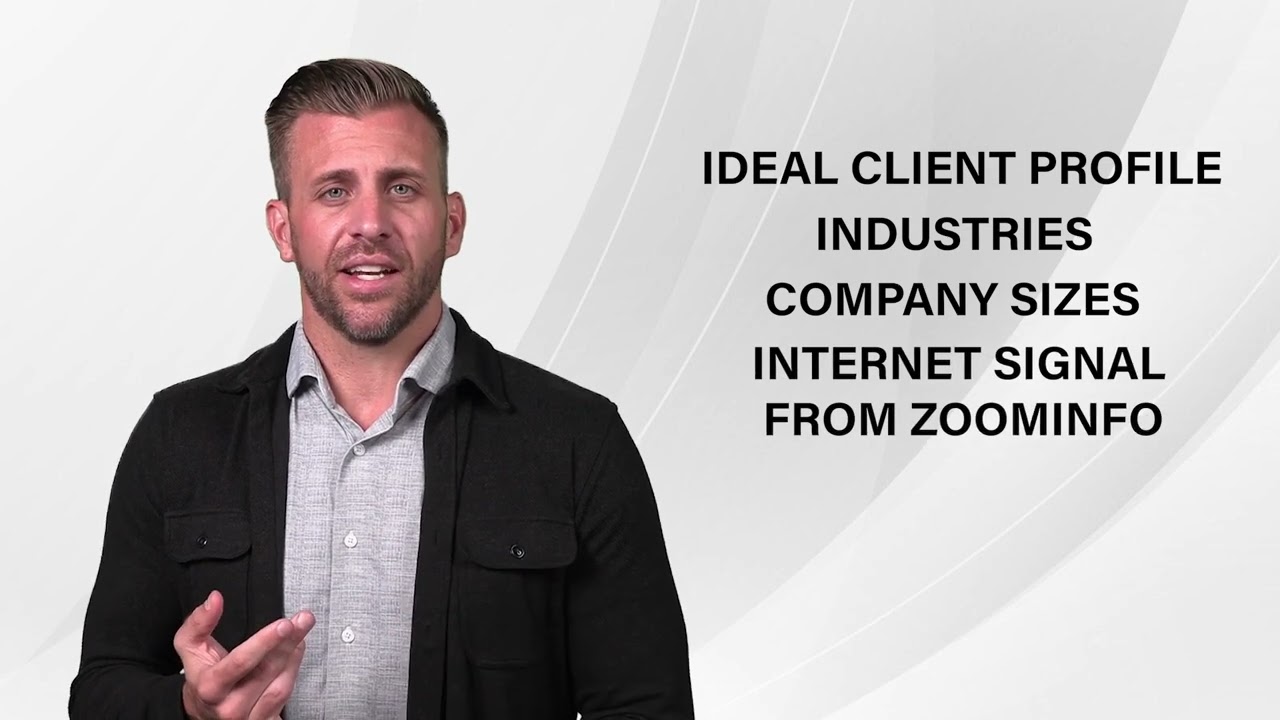
- This is the “outer layer” of the RevEfficiency model: net new logos that match your Ideal Client Profile (ICP).
- Net New Clients: First-time prospects with no prior relationship.
- Net New Client with Specific Intent Topics: Prospects showing research intent on solutions you provide (ZoomInfo intent signals, Google trends).
- Target Accounts: High-value accounts strategically chosen (ABM).
- ICP Persona: Leads who match your Ideal Client Profile criteria.
- Buyer Personas: Contacts matching specific decision-making roles (CIO, CFO, IT Manager, etc.).
- ZoomInfo Intent Leads: Accounts showing intent on buying signals (research, content engagement).
- ZoomInfo Scoops Leads: Accounts with new developments (leadership changes, funding, M&A) that indicate opportunity.
- Leads Meeting Your Buyer Persona and ICP Criteria: The highest-priority prospects who perfectly fit your profile.
Key takeaway
The Rev Efficiency model ensures you start with the warmest revenue sources (KEEP, GROW), then move outward to network leverage (MULTIPLY), before recapturing lost/warm leads (CONVERT), and finally investing time and resources into net-new accounts (EXPAND).
More on each stage
- Grow: Find Upsell Opportunities in Your Customer Base
- Grow: Build a Resell List From Current and Past Clients
- Convert: How to Work Your Marketing Qualified Leads (MQLs)
- Convert: How to Work Your Sales Qualified Leads (SQLs)
- Convert: Revisit Past Meetings That Never Became Deals
- Convert: How to Reactivate Stalled Deals
- Convert: Re-engage Lost Deals Before Their Contract Renews
- Convert: How to Win Back Former Clients
Mining for Gold: Unlock Hidden Revenue in HubSpot
Overview
Your CRM is full of opportunities you’ve already paid to acquire, they’re just buried in call notes, account notes, or forgotten deals. Quantum’s Mining for Gold process surfaces these hidden signals so your team can re-engage and close overlooked deals.
Instead of only focusing on net-new leads, we help you recover sunk client acquisition costs (CAC) by finding deals where the buying intent is already visible, but never acted on.
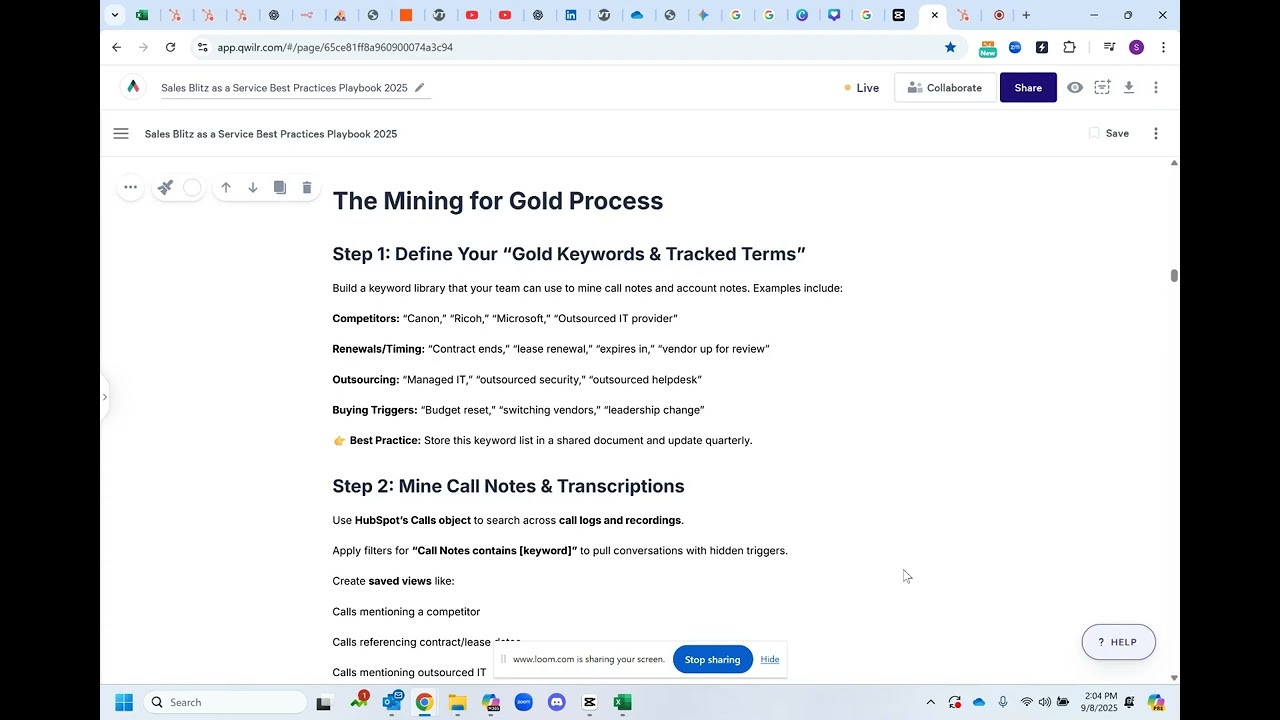
The Mining for Gold Process
Step 1: Define Your “Gold Keywords & Tracked Terms”
Build a keyword library that your team can use to mine call notes and account notes. Examples include:
- Competitors: “Canon,” “Ricoh,” “Microsoft,” “Outsourced IT provider”
- Renewals/Timing: “Contract ends,” “lease renewal,” “expires in,” “vendor up for review”
- Outsourcing: “Managed IT,” “outsourced security,” “outsourced helpdesk”
- Buying Triggers: “Budget reset,” “switching vendors,” “leadership change”
Best Practice: Store this keyword list in a shared document and update quarterly.
Example: for Office Equipment and Managed IT it may be:
Call Notes contains exactly 2026, 2027, 2028, 2029, 1 year, 1 yr, 2 year, 2 years, 2 yr, 2 yrs, 3 year, 3 years, 3 yr, 3 yrs, 4 year, 4 years, 4 yr, 4 yrs, 5 year, 5 years, 5 yr, 5 yrs, Agreement, Agreements, already have, another company, another year, Applied, Canon, comes up, coming up, Contract, contracted, Contracting, Contracts, COTG, current company, End, End Date, exp, expiration, expired, expires, expiring, five year, five years, for another expires, four year, four years, happy with, has someone, have someone, HP, IT company, HPS, just go, just signed, Konica, Lease, Lease Agreement, Leased, Leases, Leasing, managed IT company, MPS, MSP, one year, outsource, outsourced, outsourcing, Provider, remaining, renew, renewal, renewed, renewing, renews, Ricoh, sign, signed, three year, three years, Toshiba, two year, two years, up in, Vendor, works with, Xerox, years left, or yrs left
Step 2: Mine Call Notes & Transcriptions
Use HubSpot’s Calls object to search across call logs and recordings.
Apply filters for “Call Notes contains [keyword]” to pull conversations with hidden triggers.
Create saved views like:
- Calls mentioning a competitor
- Calls referencing contract/lease dates
- Calls mentioning outsourced IT
This ensures reps don’t just rely on memory, the system surfaces overlooked opportunities.
Step 3: Mine Account Notes (Global Search)
Use HubSpot’s global search bar to look for gold keywords across all account notes, calls, and engagements.
Create filtered views like:
- “Notes contains ‘renewal’”
- “Notes contains competitor name”
This allows you to mine insights even if they were never tied to a deal or logged properly.
Step 4: Build Call Lists Around Engagement Gaps
Combine mining keywords with activity-based call lists to ensure no deal is forgotten. Examples:
- Contacts associated with deals that have no engagement in 30, 60, 90 days
- Stalled deals in pipeline (no next activity logged)
- Deals with no associated contacts or companies
- Former clients with no contact in 90 to 180 days
These lists create “catch-up” call blitzes, ensuring reps always have a prioritized set of warm opportunities.
Step 5: Automate with Smart Lists & Workflows
Smart Lists: Segment deals and contacts with gold keywords, stalled activity, or upcoming renewal dates.
Workflows: Trigger tasks or notifications when a keyword is detected or a deal hits an inactivity threshold.
Example: If a deal has no activity in 60 days → auto-create a task for the owner.
Example: If call notes include “renewal” → add company to Renewal Watchlist.
Step 6: Run Quarterly Mining Reviews
Align this process with Sales Blitz and QBRs.
Review mined lists, prioritize by revenue potential, and assign ownership.
Track conversions from mined leads to prove ROI.
Why It Works
- Maximizes ROI: Recovers opportunities from past investments.
- Shortens Sales Cycles: Prospects already know you.
- Creates Accountability: Lists + workflows ensure nothing slips through the cracks.
- Scalable: Run every quarter to fuel pipeline alongside net-new outreach.
Ideal Client Profile(ICP)& Buyer Personas
Whether you're furnishing the lead list or Quantum is sourcing the data, the utmost importance lies in having a well-defined Ideal Client Profile (ICP) and Buyer Personas. This clarity serves as a pivotal foundation for targeted and effective outreach.
Ideal Client Profile (ICP)
Your Ideal Client Profile (ICP) is a detailed description of the type of company or organization that aligns best with your products, services, and business goals. It's a blueprint of the ideal customer you want to attract and serve. Defining your ICP involves analyzing various factors such as industry, company size, geographic location, budget, challenges, and goals. By having a clear ICP, you're able to focus your efforts on targeting prospects who are more likely to benefit from your offerings and become long-term, high-value customers.
Buyer Personas
Buyer Personas are fictional representations of your ideal customers. They go beyond demographics and delve into the motivations, needs, pain points, and behaviors that drive purchasing decisions. Buyer Personas are created by gathering insights from market research, customer interviews, and data analysis. Each persona represents a distinct segment of your target audience and helps you tailor your messaging and approach to resonate with their specific preferences and challenges.
Why ICP and Buyer Personas matter
- Precision Targeting: Both ICP and Buyer Personas enable precise targeting. You're directing your efforts towards prospects who are most likely to have a genuine interest in your offerings, increasing the likelihood of conversion.
- Relevance: When your outreach aligns with the needs and goals of your ICP and Buyer Personas, your messages are more relevant and engaging, fostering a stronger connection.
- Efficiency: Instead of casting a wide net, focusing on ICP and Buyer Personas optimizes your resources, ensuring that your marketing and sales efforts are efficient and effective.
- Personalization: By understanding the unique challenges and motivations of each persona, you can tailor your interactions to provide personalized solutions, demonstrating your understanding of their individual needs.
- Consistency: ICP and Buyer Personas provide a consistent framework for your team's approach, helping everyone understand and target the same high-priority prospects.
In essence, having a well-defined ICP and well-developed Buyer Personas is akin to having a compass that guides your sales and marketing efforts in the right direction. They ensure that you're not just reaching out, but truly connecting with the right prospects in a meaningful way.
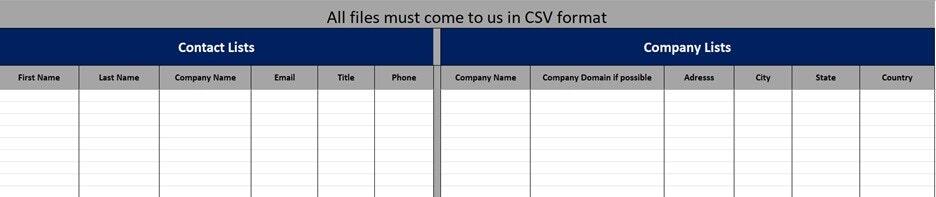
Lead List Format
Lead lists you are providing to Quantum should be submitted as a CSV file in the following template, which will be provided to you. If you are submitting lists for specific reps, we will need a separate file for each sales rep.
Chapter 3
Messaging and Training
What to say when the line connects, and how to answer what comes back.
Messaging / Training
Attached is a video message from Chris Beall, CEO of Connect and Sell that provides important insight on the type of messaging
Breakthrough Messaging with Chris Beall, CEO of Connect and Sell

Breakthrough Script: Framework
Phase 1, Version 1
©Quantum Business Solutions, Shawn Peterson
PDF Version of this Template: https://hubs.ly/Q02HmHj30
Word Document Version: https://hubs.ly/Q02HmHh80
Tone: Non-supplicative, confident without pushy…to be delivered authentically and with just enough of a stammer and a thoughtful grasping for words so it feels non-scripted. Deliver with slightly above a monotone hitting the emphasis on the highlighted words… (your status alignment will come from this tone). This is NOT to be delivered with overt enthusiasm).
We should come across as:
1. “Pre-chasm” Thought leaders, we are Company name…We passionately CARE about the entire client experience…from the pitch to the sale to the technology impact!
2. Seasoned professionals, utilize deeper tones, slower pace, more ‘banking and executive-like,” and less small talk. Confident but never cocky.
3. Very collaborative in setting up any next steps or passing on “one-pager executive briefing documents” (Tier 2 leads) No neediness!
Pace: Tease this with a slow and “careful” pace out of the gate and proceed faster with each paragraph until the “nurture” step when asking for the meeting. These are predominantly business owners, CEOs, COOs, CFOs, partners…so be aware of unnecessary modulation and be conscious of your attitude!
Regions: Target Region
Additional Information: Have the website up in your browser for additional reference and soundbites.
________________________________________________________________________________________
Tip: You have 7 seconds to create trust on a cold call

Breakthrough Messaging Framework
| Greeting Opener | Hey, it’s [Gregg Quisito] at [Celebration Marketing]. |
|---|---|
[Contact Name], I know I'm an interruption; can I have 27 seconds to tell you why I called? (Wait for response) Great, thanks. | |
Breakthrough Value | I believe we've discovered a breakthrough that increases rewards and loyalty enrollment members by leaps and bounds over traditional methods and will produce exponential ROAS. |
Reason Schedule | …the reason for my call is to get 15 minutes on your calendar to share this breakthrough with you... |
…do you happen to have your calendar available? | |
Transition | Great, thanks. |
Let me give you an example... | |
Expansion | - For Shelby Ziga, Marketing Directorat [Texas Roadhouse, PHX, [Celebration Marketing] has been a game changer! - We found we were able to increase their [Loyalty Membership by a factor of 10 with associated ROAS of $7.30:1], much more than everyone expected. |
Redirection | …I highly suspect sharing a few minutes with us can illuminate what this breakthrough would mean to you. |
Are mornings or afternoons usually better for you? | |
Pushback Redirect | We’ve learned the hard way that an ambush conversation like this is simply not a fair setting to talk about something this important to your business. |
Schedule | Are you more of a morning person or afternoon person? |
Qualify | What’s the best email to reach you at? Just to be sure our conversation on [Date and Time] is valuable for the both of us, I just gotta ask… How many…? and How do you…? |
Response Matrix
| Customer Response | Transition | Expansion | Redirection |
|---|---|---|---|
Yes | - (Smile and chuckle) Fantastic! | - Let’s take a look (at our calendars)... | - how does [date and time] or even [date and time] look? |
No (may or may not have it) | - (Smile and chuckle) No problem… - I can wait for you to get it… (HOLD) | - I can take care of that for us, I have my calendar here… - I’ll find some time for us in a couple of weeks... | - Are mornings or afternoons usually better for you? |
Not Me (may or may not be the right person) | - Aw, thanks for letting me know… - (Ha) I definitely want to be speaking with the right person... | - I have that you’re the [Title]? (wait for a yes or no) Got it. - We | |
Not Now (all set; no need; not looking) | |||
What is the breakthrough? | - (Smile and chuckle), well... - Let me give you an example... | - For [Customer Contact Name], the [Title] at [Customer Company Name], [Your Company Name] has been a game changer! - We found we were able to increase their [ABC, by a factor of # or %], a lot more than we expected. - If I recall, it could have been as much as [$___ in uplift]. | - I highly suspect spending a few minutes with us can clarify what this breakthrough would mean to you. - Are mornings or afternoons usually better for you? |
Send me information... |
Breakdown of Breakthrough Messaging Framework
| What to Say | How and Why to Say It | |
|---|---|---|
Greeting | “Hey, this is [Your Name] from [Your Company Name].” | Start casual and friendly, like you know them. Don’t try to be invasive. Come right out with your name and company. Your initial honesty will be rewarded. |
Opener | “I know I'm an interruption;” “can I have 27 seconds” “to tell you why I called?” | Pattern Interrupt: Take personal responsibility for being an interruption, don’t apologize, own it, it’s a shared truth that is hard to disagree with. Demonstrate that you see the world through their eyes, but that you have a competent solution to the problem they are facing in that moment, that the problem is YOU. Upfront Contract: Switch to a playful (chuckle) and curious voice when asking for 27 seconds. |
Breakthrough Value | “I believe” “we have discovered” “a breakthrough” “[WIIFM]” Economic, Emotional, and Strategic Value | “I believe” is an arresting statement of fact. When someone else expresses a simple belief, we need to hear the punch line. “You believe what?” “we have discovered” says clearly that whatever “I believe” was not cooked up for the purpose of making a buck; it is something true that has simply been found out. And not just by one person, but by “we,” who are less likely to be mistaken. “a breakthrough” goes out on a limb, promising not just incremental or temporary value, but potentially something game-changing. Move the prospect to a more curious state. A “What’s In It For Me” (WIIFM) statement resolves the question of “what is the breakthrough?” by simply and clearly stating the nature of the breakthrough. If you are responsible in any way, a claimed breakthrough of this kind is worth learning more about. The WIIFM statement should have economic, emotional, and strategic value components. Avoid how/why/what and any industry or category words. |
Reason | “The reason I called is to get 15 minutes on your calendar to share this breakthrough with you.” | You’ve been given 27 seconds to say why you called. In this sentence, you keep your promise. In well under 27 seconds, the purpose of your call is clearly stated: you’d like a brief, scheduled meeting to share this important breakthrough. Everything about your purpose for calling is laid out clearly, directly, and respectfully. |
Schedule | “Do you happen to have your calendar available?” | Your purpose is clear, you simply ask whether the means, the prospect’s calendar, are available to take the next obvious step: to set a date and time for a 15-minute conversation for the purpose of learning more about the breakthrough. |
After You Ask for Their Calendar
| Once you ask, “do you happen to have your calendar available?” ...in most cases, you will hear the prospect pause as they consider their calendar and when they might have time to speak to you. This means you win! It is critical that the prospect speaks next. Bite your tongue. Be silent and wait for it… keep waiting… only the prospect should break the silence! If they say YES, work with them to find a time that works best for the both of you. |
|---|
However, often the prospect’s defense mechanism will kick in and they may ask you a question: “What is the breakthrough?” “Who are you?” “What is this about?” When the prospect asks for more information, remember IT’S A TRAP. They are trying to get you to say something they can use to quickly categorize you and decide they don’t need to talk to you. Depending on how you answer the question they often say “We are all set, thanks.” You must avoid industry / technical / category language at all costs. You have aroused their curiosity and you must ensure the only way they can satisfy that is to accept the invitation and show up for the meeting. |
| What to Say | How and Why to Say It | |
|---|---|---|
Redirect | We’ve learned the hard way that an ambush conversation like this is simply not a fair setting to talk about something this important to your business. Are you a morning person? How does Tues or Wed look? | Since cold calls are an ambush, you most likely do not have their undivided attention. Keeping in mind you have delivered on the 27 secs, you can redirect them to the purpose of this call, “to get 15 mins to share this breakthrough.'' For them to grasp the value and implications of the breakthrough, a scheduled call is a fairer and more productive setting. |
Expansion | For [Customer Contact Name] at [Customer Company Name],[Your Company Name] has been, a, game, changer! We found we were able to increase their [ABC, by a factor of # or %], a lot more than we expected. If I recollect, it could have been as much as [$___ in uplift]. I highly suspect spending a few mins with us can clarify what this breakthrough would mean to you. Are mornings or afternoons usually better for you? | This is a statement you can use when the prospect says "tell me more" after you’ve asked "Do you happen to have your calendar available". The recommendation is that this expansion statement leverages a protagonist in a story that expands on the "what's in it for them" component. This helps you avoid product talk, who we are, what we do, insert marketing category language, etc. |
Qualify | What’s the best email to reach you at? Just to be sure our conversation on [Date and Time]is valuable for the both of us, I just gotta ask… How many…? and How do you…? | If necessary, ask 2-3 specific questions which answers will enhance the value of the scheduled meeting. Stay away from Qs that require homework, or elicit answers that can be learned through publicly available information. |
| Expansion Examples |
|---|
1) Daffy Duck at XYV, ABC Co has been a, game, changer! We found that we could increase his reimbursement revenue generated from auto/liability claims, by 5x, a lot more than we expected. It could have been as much as $4M- $5M in uplift… I strongly suspect that us spending 15min together will clarify what this breakthrough might mean for you. 2) "I don't know what the secret sauce is that makes it work. All I know is that it's changed my life. As I'm sure you know, cold calling senior executives such as yourself is tough, and I know a lot of people that give up and just send emails and hope for a response. Me, I get to push a button and have 30 or 40 conversations like this every day. It's the biggest game changer I've ever seen, not like anything else out there. It's not for everybody, you've got to be good at having conversations, but from my experience it's definitely worth 15 minutes to learn more." 3) “Dr. Fifi at ABC Company was frustrated by significant delays in time-to-treatment despite years of research and optimizing stroke protocols. After working with [Customer Name], outcomes improved by 50%. I’m sure the conversation with [Customer Name] will be worth your time.” 4) “I don’t know the secret sauce. I can tell you that for Theresa Slack at XYZ company, she was about to give up on her business, but after working with [Customer Name] she was just awarded 2020 Firm of the Year! I strongly suspect that a 15 minutes conversation will clarify what the breakthrough might mean for you.” 5) “We know your most important patients are not techies and this means they struggle to engage with you so you can provide the care they need. It’s also a breakthrough way to grow your practice at a fraction of the cost of a medical grade solution.” |
Chapter 4
Rep Performance
How a calling day runs, from preparation to dispositions to follow-up.
PREPARATION for Reps: Day Prior to Calling
Review your lists to know what persona you will be speaking with.
Review script/screenplay to familiarize yourself with what you will say.
Roleplay/Practice script with a co-worker/manager. Practice, practice, practice until it feels natural.
Calling Day
Always access Connect and Sell through Google Chrome browser.
Access Google Chrome in ‘INCOGNITO’ mode by clicking on the 3 dots located in the top right corner of your screen, select “New Incognito Window."
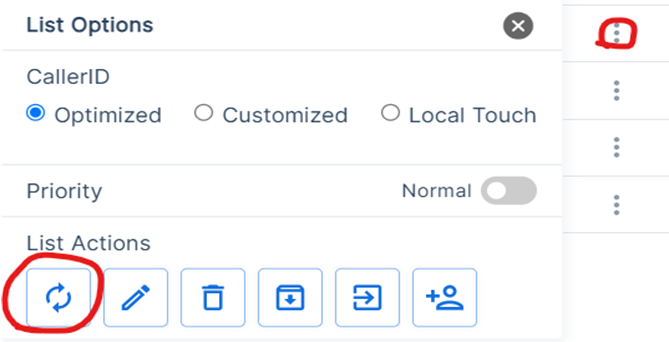
Once signed onto Connect and Sell, refresh your lists. You do this by clicking on the 3 dots located on the right side of your screen next to the list you will be working. Hit the button with the 2 swirling arrows in the ‘List Actions’.
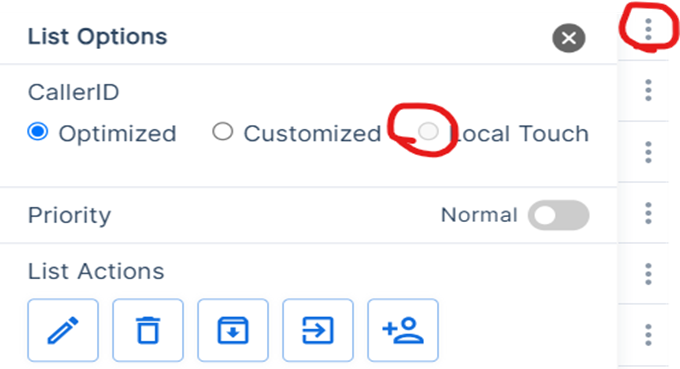
Once the lists are refreshed, change your Caller ID to ‘Local Touch’. This will show a local number that you will be calling from.
List Prioritization
For each blitz day, it is crucial for your sales reps to adopt a strategic approach to maximize their opportunities. Here's how they should prioritize their calls.
Start with No Shows and Follow-Ups
Sales reps should kick off their calling sessions by prioritizing No Shows and Follow-Ups if there are callable targets in these lists. These are contacts who have previously engaged and have explicitly expressed interest in meeting or being contacted again later. Notably, they have already demonstrated their responsiveness (picker-uppers) and are statistically 50% more likely to accept a meeting compared to other call categories.
Manager-Assigned Lists
Next in line are lists specifically assigned by their respective managers for the day's blitz. Reps should diligently work through these lists, adhering to any specific instructions provided by their managers. This ensures that we address high-priority leads and opportunities as directed by your leadership.
Strategic List Selection
In the absence of explicit directions, reps should prioritize calling lists that hold the highest likelihood of conversion. This includes identifying upsell opportunities among existing customers and focusing on leads that have been nurtured and warmed up through marketing efforts. By targeting leads that are more likely to convert, we can make the most efficient use of calling time.
By following this prioritization strategy, sales reps can make the most of their blitz days, optimizing their efforts for higher engagement, conversion rates, and ultimately, success in building your sales pipeline.
Call Dispositions Overview:
In Connect and Sell, call dispositions refer to the categorization and labeling of the outcomes of sales or prospecting calls. Each call is assigned a disposition to document what happened during the call, such as whether it was a successful connection, a voicemail, a not interested response, a follow-up required, and so on.
The importance of appropriately dispositioning calls in Connect and Sell cannot be overstated. Here are key reasons why it's crucial:
Tracking Progress: Dispositions help sales teams track their progress and performance over time. By categorizing calls accurately, you can measure metrics like conversion rates, response rates, and success rates.
Segmentation: Properly labeled dispositions enable you to segment your leads and prospects effectively. This segmentation can inform your follow-up strategy, ensuring that you tailor your messaging to the specific needs and interests of each group.
Personalization: Call dispositions provide valuable insights into a prospect's objections, interests, or concerns. This information is vital for crafting highly personalized follow-up emails and messages that address their specific pain points.
Lead Nurturing: By dispositioning calls appropriately, you can identify warm leads that require immediate follow-up and prioritize them over colder leads. This ensures that your team focuses its efforts on leads more likely to convert.
Feedback Loop: Dispositions facilitate a feedback loop between the sales team and the marketing team. Marketing can use disposition data to refine lead generation strategies, content, and messaging to better resonate with prospects.
Compliance and Reporting: Accurate call dispositions are essential for regulatory compliance, especially in industries with strict calling regulations. They also provide a foundation for generating meaningful reports and analytics.
Sales Forecasting: Disposition data plays a role in sales forecasting, helping organizations project future revenue and set realistic sales goals based on historical call outcomes.
Efficiency: When calls are dispositioned correctly, sales reps can quickly identify the next steps required for each lead, streamlining their workflow and improving productivity.
In summary, call dispositions in Connect and Sell serve as a critical tool for managing and optimizing the sales process. They enable sales teams to track progress, personalize outreach, prioritize leads, and maintain compliance. By consistently and accurately dispositioning calls, you can improve your follow-up strategies and increase the likelihood of converting leads into customers.
Sales Reps require comprehensive training to ensure the accurate marking of custom call dispositions, thereby enhancing the precision of future interactions. Equally vital is preventing the improper labeling of calls as "Do Not Call," which could inadvertently exclude viable leads from further engagement. Additionally, it is imperative to conduct regular reporting reviews to identify and address instances where specific reps disproportionately apply disqualifying dispositions. For such individuals, personalized training may be necessary.
Custom call dispositions can be configured in both Connect and Sell and HubSpot, unlocking the potential for automated sequences and workflows based on these dispositions.
Select Appropriate Call Dispositions
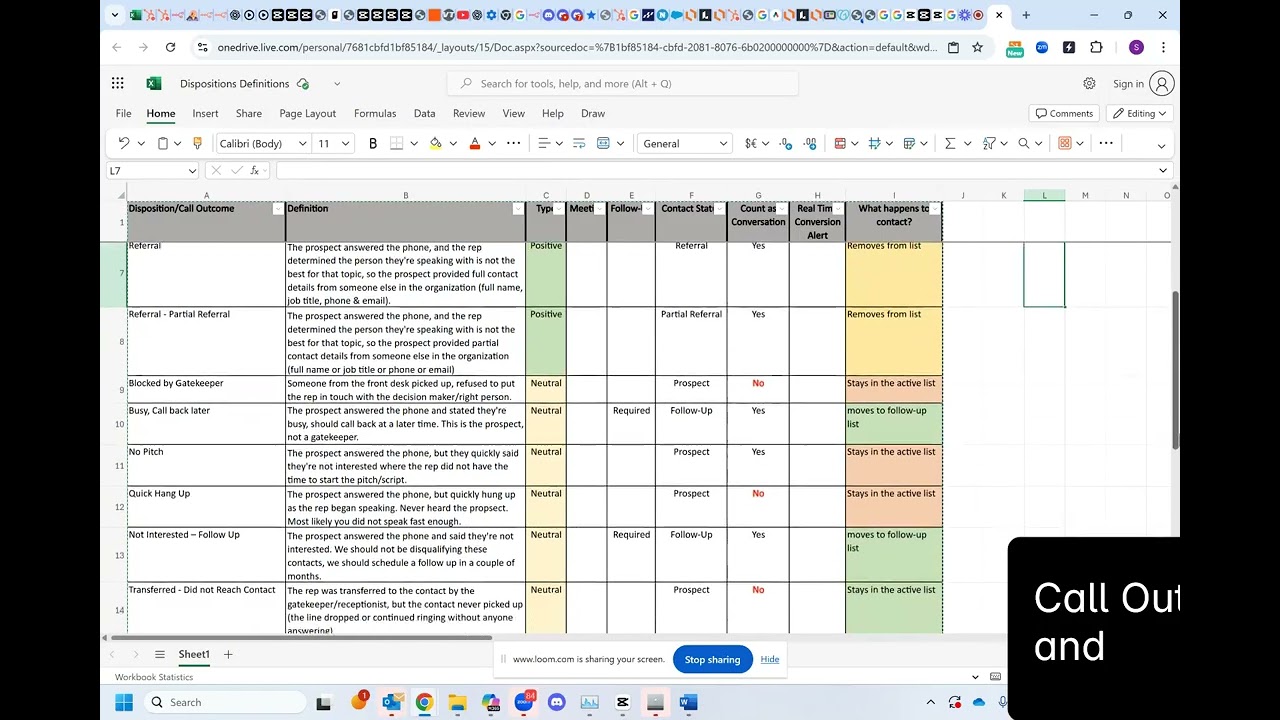
Select the correct disposition when the call is completed by using the attached reference table. This should be kept in sight while dialing.
Overview:

| Disposition | Definition | Type | Follow-up | Contact Status |
|---|---|---|---|---|
Busy, Send Information | The prospect answered the phone and stated they're busy and requested additional information to be emailed to them. This is where we send a sequence with product/service one-pager. | Positive | Required | Follow-up |
Interest, Call back later | The prospect answered the phone and stated they're interested to chat, but are busy at the moment and the rep should call them back at a later date/time. | Positive | Required | Follow-up |
Interest, Send Info | The prospect answered the phone and stated they're interested and requested additional information to be emailed to them. This is where we send a sequence with product/service one-pager. | Positive | Required | Follow-up |
Meeting Rescheduled | The prospect answered the phone and the rep worked with them on re-scheduling the meeting where they previously no-showed / cancelled. Not a net new meeting. | Positive | Meeting Set | |
Meeting Scheduled | The prospect answered the phone and the rep successfully set up a meeting with someone (usually, a calendar invite should be sent on the call, and the rep should confirm the prospect received it and confirmed their attendance). Net new meeting. | Positive | Meeting Set | |
Referral | The prospect answered the phone, and the rep determined the person they're speaking with is not the best for that topic, so the prospect provided full contact details from someone else in the organization (full name, job title, phone & email). | Positive | Referral | |
Referral, Partial Referral | The prospect answered the phone, and the rep determined the person they're speaking with is not the best for that topic, so the prospect provided partial contact details from someone else in the organization (full name or job title or phone or email) | Positive | Partial Referral | |
Blocked by Gatekeeper | Someone from the front desk picked up, refused to put the rep in touch with the decision maker/right person. | Neutral | CAS Prospect | |
Busy, Call back later | The prospect answered the phone and stated they're busy, should call back at a later time. | Neutral | Required | Follow-up |
No Pitch | The prospect answered the phone, but they quickly said they're not interested where the rep did not have the time to start the pitch/script. | Neutral | CAS Prospect | |
Quick Hang-up | The prospect answered the phone, but quickly hung up as the rep began speaking | Neutral | CAS Prospect | |
Not Interested, Follow Up | The prospect answered the phone and said they're not interested. We should not be disqualifying these contacts, we should schedule a follow up in a couple of months. | Neutral | Required | Follow-up |
Transferred, Did not Reach Contact | The rep was transferred to the contact by the gatekeeper/receptionist, but the contact never picked up (the line dropped or continued ringing without anyone answering) | Neutral | CAS Prospect | |
Transferred, Left Voicemail | The rep was transferred to the contact by the gatekeeper/receptionist, but the contact voicemail was reached and a voicemail message was left | Neutral | CAS Prospect | |
Disqualified, Reason in Notes | Contact and their company are not a part of ICP for ANY product or service. | Negative | Disqualified | |
Do Not Call | The prospect answered the phone and stated they're on the National Do-Not-Call list, this outcome signifies we should no longer try to call that individual. | Negative | Do Not Call | |
Incorrect Contact | The prospect answered the phone, but the rep determined that the person they spoke with does not reflect the details from the CRM. | Negative | Incorrect Contact | |
Retired, Remove from all Lists | The prospect answered the phone and stated they are retired. | Negative | Retired | |
No Longer with Company | The prospect answered the phone and the rep determined the person they wanted to get in touch with is no longer with the organization. | Negative | No Longer with Company | |
Not Decision Maker | The prospect answered the phone, and during the conversation, the rep determined they are not speaking with a decision maker for that topic in the organization. | Negative | Not Decision Maker | |
Wrong Number | The prospect answered the phone, and during the conversation, it was determined that this is not the person the rep was trying to reach. | Negative | Wrong Number |
Call Disposition Standards:
Conversion Rate:
Over 5% Pass
3, 5% Neutral
Under 3% Fail
Meeting No Show Rate:
65% + Pass
50, 59% Neutral
Under 50% Fail
D2C: Dial to Contact:
1, 10 Pass
11, 20 Neutral
Over 20 Fail
D2M: Dial to Meeting:
> 400 Pass
400, 700 Neutral
Over 700 Fail
Meetings per Hour:
GT 0.41 Pass
0.25, 0.40 Neutral
Under 0.25 Fail
Disposition Outcomes:
Do NOT Call: never exceed 5%
Disqualified: never exceed 5%
Quick Hang-up never exceed 10%
No Pitch: never exceed 10%
Wrap Time Average:
30, 45 sec p/conversation Pass
45, 60 sec p/conversation Neutral
>60 sec p/conversation Fail
Common Custom Questions
Listed below are samples of Customer Questions that can be used to gather information from your prospects when calling on the dialer
Who is in the Buying Role?
Who is your current IT provider?
Do you outsource your IT services or support?
Competitive Copier Lease Expiration Date?
Are your copiers owned or leased?
Who services your copiers and printers?
Type of copiers/printers?
Post Meeting Follow-up Best Practices
Effective follow-up after a sales meeting is a cornerstone of successful sales strategies. It's the bridge that transforms promising discussions into closed deals and long-term customer relationships. In this guide, we present a comprehensive list of best practices for post-sales meeting follow-up. These strategies not only ensure that prospects remain engaged throughout the sales cycle but also demonstrate your commitment to solving their challenges and meeting their needs. By implementing these practices, your sales team can build stronger client relationships, increase conversion rates, and drive business growth.
Prompt Thank-You: Send a personalized thank-you email immediately after the sales meeting to express appreciation for the prospect's time and reiterate key takeaways.
Meeting Recap: Provide a concise summary of the meeting's discussions, highlighting pain points, solutions, and action items, and share it with the prospect.
Follow-Up Timeline: Establish a clear follow-up timeline, including specific dates for next steps, follow-up calls, and additional meetings, and communicate this timeline with the prospect.
Personalized Content: Tailor follow-up materials and content to address the prospect's unique needs and challenges, demonstrating a commitment to solving their problems.
Joint Sales and Marketing Efforts: Collaborate closely with the marketing team to ensure a seamless transition from marketing-generated leads to sales engagement post-meeting. Use marketing-approved content and resources to reinforce key messages and educate prospects further.
Active Lists and Reporting: Maintain active lists and reporting to identify contacts who have had a meeting but have not been contacted in 30, 60, or 90 days. Regularly review and update these lists to prevent leads from falling through the cracks.
Automated Nurturing Sequences: Implement automated nurturing sequences for prospects who are not ready to move forward immediately. These sequences can include follow-up emails, relevant content, and reminders for scheduled touchpoints.
Personalized Touchpoints: Make personal follow-up calls, emails, or messages at agreed-upon intervals to keep the prospect engaged. Address any questions or concerns raised during the sales meeting promptly.
Value Delivery: Continuously provide value to the prospect by sharing industry insights, relevant case studies, or success stories that align with their interests.
Feedback Loop: Gather feedback from the prospect regarding their experience and any additional information or resources they may require. Use this feedback to refine your approach and customize your follow-up efforts.
Regular Updates: Keep the prospect informed about any developments, updates, or new offerings that may be relevant to their needs. Share relevant news or industry trends that showcase your expertise.
Personalized Proposals: If applicable, create customized proposals or quotes that address the specific solutions discussed in the meeting. Ensure timely delivery and follow-up regarding proposal acceptance.
Scheduled Check-Ins: Schedule regular check-in calls or meetings to maintain an ongoing dialogue and build a strong relationship with the prospect.
Documentation and CRM Updates: Maintain detailed records of all interactions and update the CRM system with the latest information, ensuring data accuracy.
Continual Assessment: Continually assess the prospect's engagement level and adjust your follow-up strategy accordingly. Identify potential obstacles or objections and proactively address them.
By following these best practices, sales reps can nurture prospects effectively, maintain engagement throughout the sales cycle, and increase the likelihood of successful conversions. This approach helps build stronger client relationships and ensures a more seamless transition from initial contact to closing the deal.
Boost Show Rates and Handle No-Shows
Learn effective strategies to boost your show rate for meetings and appointments.

How to bump your show rate
- Within 24 hours of the meeting being set, request to connect on LinkedIn.
- Two days before the meeting, send a third-party educational piece.
- The night before, or the morning of the meeting, place a reminder call.
If you have a no-show
- At the 3-minute mark, reply to the invite, and ask if it is still a good time to meet. Inform the contact that the bridge is set up.
- At the 7-minute mark, go ahead and give the contact a call.
- If you still get no response, send an updated invite for the following day at the same time, or for the next week, on the same day of the week, at the same time. Reference that this seemed to be a good time for the contact to meet so you are hoping this works for them. Include your meeting link in case they need to select an alternative meeting time.
Automated Meeting Reminders
Utilize an automated reminders to ensure attendees receive timely notifications about the upcoming meeting, enhancing their preparedness and punctuality.
Provide Insightful Pre-Meeting Email:
Send a concise and informative email detailing what participants can anticipate during the meeting. This summary not only sets clear expectations but also primes attendees for a productive and focused discussion, enhancing the overall meeting experience.
10 Common Mistakes of Sales Follow-ups
Following up on sales calls effectively is crucial for converting leads into customers. Here are the top 10 mistakes people often make when following up on sales calls:
1. Lack of Timeliness: Waiting too long to follow up can result in lost opportunities. Follow up promptly to keep the conversation fresh.
2. Being Too Pushy: Being overly aggressive can turn potential customers away. It's important to balance persistence with respect for the prospect's time and decision-making process.
3. Not Personalizing the Follow-Up: Sending generic follow-up messages can make prospects feel undervalued. Personalize your follow-up to show that you remember their specific needs and concerns.
4. Failing to Provide Value: Simply asking if they've made a decision isn't enough. Provide additional value in your follow-up, such as answering questions, offering new insights, or sharing relevant resources.
5. Ignoring Multiple Channels: Relying solely on one communication channel (e.g., email) can be limiting. Use a mix of channels such as phone calls, emails, social media, and even handwritten notes.
6. Not Tracking Follow-Ups: Without a system to track your follow-up efforts, it's easy to lose track of where each prospect is in the sales process. Use a CRM or other tracking tools.
7. Forgetting to Confirm Details: Confirming key details and next steps ensures clarity and helps avoid misunderstandings. Make sure both parties are on the same page.
8. Neglecting to Address Objections: If prospects have concerns or objections, address them head-on rather than ignoring them. This builds trust and can help move the sale forward.
9. Lack of Consistency: Inconsistent follow-up can make you appear unreliable. Establish a follow-up schedule and stick to it to build trust and show commitment.
10. Not Asking for Feedback: Feedback from prospects can provide valuable insights into how you can improve your approach. Don’t be afraid to ask how you can better meet their needs.
By avoiding these common mistakes, you can improve your follow-up strategy and increase your chances of closing sales.
Chapter 5
Quality Assurance and Coaching
How to review calls and coach reps against one shared scorecard.
Quality Assurance
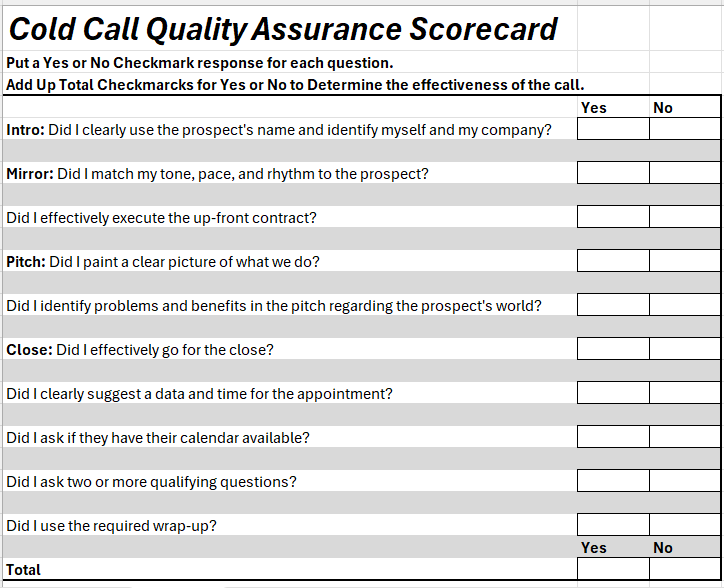
Calls should undergo regular review for training purposes and to provide feedback. The following scorecard can be utilized for this process:
Chapter 8
Lessons from the Field
Practices that keep showing up when a program works, and when it stalls.
These lessons come from running outbound calling blitzes for many teams. They are practices that keep showing up when a program works and when it stalls, not benchmarks. Set your own targets from your own data, and use these to decide what to measure and what to fix first.
What counts as a conversation
A conversation is a live exchange with the person you set out to reach. A gatekeeper connect is not a conversation, and neither is a transfer to voicemail or a wrong number. When all of them are counted together, the conversation number looks healthy while real decision-maker talk is thin.
- Log gatekeeper connects as their own outcome. Use a clear "blocked by gatekeeper" disposition so the conversation count means decision-maker talk.
- Define every disposition in one line, with an example, at kickoff. Include the confusing ones, such as callbacks and "no pitch."
- Log the true outcome, every time. Wrong dispositions break reporting and any automation that runs from them.
Diagnosing quick hang-ups
A quick hang-up is a call that ends within seconds. Some are normal. A rep whose rate is far above their peers is giving you a signal, not a result. Reps also tend to use "quick hang-up" as a catch-all for any call they are unsure how to log, so review the recordings before you act on the number.
| Likely cause | What to check |
|---|---|
The opener is too slow | Listen to the first ten seconds. Does the rep say who they are and why they called right away, or is there a pause or a long preamble? |
The rep is not ready when the line connects | Check for multitasking during wait gaps. Reps who look away from the dialer miss the first word. |
Audio or connection problems | Check the headset and the network. A weak connection sounds like a delay, and prospects hang up on delays. |
Caller ID or number reputation | Compare answer and hang-up patterns across caller ID settings. A number that looks like spam gets hung up on. |
List quality | Look for auto attendants, wrong numbers and people who have left the company. A bad list produces short calls no matter how good the rep is. |
Be ready when the line connects
In a dialer that connects the call for you, the first second matters. Stay in the dialer between connects, keep your headset on and your greeting ready, and do not work in other tabs while you wait. The reps who convert are rarely the ones with the cleverest script. They are the ones who are ready when the person says hello.
Cap the attempts, then rest and recycle
Connect rates are highest on the first attempts and fall as the same unanswered contact is dialed again and again. Dialing a number that has never answered dozens of times costs a rep many calls for very little return.
- Agree a maximum number of attempts for contacts who have never answered, and write it into the program at kickoff.
- Space the attempts. Do not redial the same contact within a session, and set a delay between attempts.
- Rest, then recycle. After the cap, move the contact to a rest period and re-queue it later, with fresh data if you can get it.
- Move exhausted contacts to another channel, such as email or LinkedIn, rather than leaving them in the dial queue.
Validate the list before the blitz
People change jobs, and the list you bought or built months ago is older than it looks. Calls to people who have left the company waste dials, and when they are logged as "connected" they inflate your numbers.
- Check employment before a blitz, especially for senior contacts and for lists that are more than a few months old.
- Use an "invalid contact" outcome for numbers that reach a former employee or the wrong person. It is not a connect.
- Refresh on a schedule. A list that was accurate at import slowly stops being accurate.
Do not let lead status take people off your call lists
Lists are usually built on filters, and one of the most common filters is lead status. A contact left at a status such as "Meeting Set" or "Connected" can quietly fall out of every active list and stay untouched for months.
- Audit your list filters against the statuses your reps actually use.
- Reset stale statuses to a status that puts the contact back in a calling list.
- Track sequence or cadence state in its own property, not in lead status.
- Check coverage. Count how many of your identified decision makers have actually been called, and make sure every contact has an owner who is an active rep.
Push contacts into the CRM before you dial them
If enriched contacts reach your CRM weeks after they were dialed, real conversations are hidden and the dashboard is wrong. Send each contact to the CRM as soon as it is enriched, before it enters a call list, so every call and every outcome lands on a record that already exists.
Aim at the decision maker, and use everyone else as a route to one
Some titles book meetings easily and rarely decide. Office managers are a common example. They are often friendly and helpful, but a meeting with them seldom turns into a deal.
- Define your target titles before you build the list, and aim at senior decision makers first.
- Treat a gatekeeper or office manager as a route to a referral. Ask who handles the decision, and for how to reach them.
- Lead with the business problem, not one product category. A narrow opener narrows who thinks it applies to them.
Prefer direct and mobile numbers, and test your call windows
Direct and mobile numbers reach people more often than switchboards. Mobile numbers can also bring friction, so respect opt-outs and local rules. Time of day matters too, but it differs by market and role, so test windows with your own data rather than assuming a rule.
Work missed meetings first
No-shows and follow-ups are the warmest numbers on your list, and they are the easiest to forget. Put them at the top of the calling order every day.
- Build a no-show list into the dialer so recovery is automatic, not something reps have to remember.
- Keep trying. A prospect who misses a meeting once is often still interested.
- Update the status after every meeting, even a missed one. An unmarked no-show is a lost lead.
- Keep a patient follow-up status for earlier prospects. Call them less often and with more patience than a cold contact.
Never leave a call or a meeting without a dated next step
The cheapest meeting you will ever book is the next one with someone you are already talking to. Before you end a conversation, agree on the next step and put a date on it. Stalled deals very often have one thing in common: nobody set the next meeting.
When transfers are healthy but meetings are not
If calls are being connected but few turn into meetings, check call quality before you blame the list or the script.
- Count quick hang-ups and "no pitch" outcomes by rep.
- Listen to the first minute of a sample of calls from your best and weakest converters.
- Check audio quality and the greeting. A short, clear recorded greeting can help.
- Check how many live connects are routed to the follow-up queue. A rep who never uses it is leaving opportunities behind.
A "no pitch" usually means we lost it, not the prospect
When a call ends before the rep ever gets to pitch, the prospect did not reject the offer. They never heard it. That is almost always a miss in the first few seconds, so treat it as ours to fix.
- Put every no-pitch call in a follow-up bucket and call the contact again, with a better opener.
- Fix the greeting first. A short, clear, recorded greeting and a consistent start often cut quick hang-ups and no-pitch outcomes, because the prospect knows who is calling before the rep speaks.
- Measure pitch rate, not just transfer rate. A healthy number of live connects is wasted if the pitch is never made.
When results fall off a cliff, find what changed
If a program that was working drops suddenly, resist the urge to blame the reps or the list first. Look at what changed around the drop.
- Dialer settings, including the time between calls and how contacts are recycled.
- Platform or system changes, including a migration, new reporting, or a change in how the dialer connects calls.
- Carrier screening and caller ID, which can change how your numbers are treated without any change on your side.
- Peers on the same platform. If other teams on the same setup dropped at the same time, the cause is probably not your reps.
- Your own data from before the drop. Keep a before and after view so you can see exactly when it moved.
Tie targets to hours on the phone
Meetings come from time spent dialing. Measure meetings per hour called, not just meetings per rep, and watch for reps who are good converters but do not call enough hours. A rep who converts well and calls too little is your fastest win: give them more phone time.
Score calls from the transcript
Reviewing calls works best when everyone scores them the same way. A simple scorecard covers the stages of the call:
- Did the opener land?
- Was the pitch made?
- Was an objection raised, and was it handled?
- Did the rep ask for the meeting, and was it confirmed?
- At what point in the call did the ask happen?
Make the first minute a standing part of every coaching review. The calls that get past it are the calls that book.
A meeting is not the finish line
A program can book many meetings and still produce few deals. Track what happens after the meeting: how many become opportunities, how many close, and where they stall. If meetings are not converting, coach the step after the meeting with the same care you give the dial.
Fields worth capturing
Every lesson above gets easier to act on when the data is in the CRM as a field you can filter, report on and automate from. If you use AI call intelligence or transcript scoring, these are the fields we would add first. Keep each one a dropdown, a yes or no, a number or a date, so it can drive a list or a report.
On the call
| Field | Type | Why it earns its place |
|---|---|---|
True outcome | Dropdown | The disposition the call really deserves, so reporting does not depend on a rushed pick. |
Reached the decision maker | Yes or no | Separates real conversations from gatekeeper connects. |
Opener landed | Yes or no | Shows whether the first ten seconds is the problem. |
Pitch made | Yes or no | Separates "no pitch" outcomes from real rejections. |
Objection raised | Multiple choice | Builds your real list of objections, ranked by how often they come up. |
Objection handled | Yes or no | Shows which objections your reps handle well and which they do not. |
Meeting asked and confirmed | Two yes or no fields | A rep who never asks and a rep who is turned down need different coaching. |
Seconds into the call when the ask happened | Number | Lets you test whether asking earlier books more meetings. |
Quick hang-up reason | Dropdown | Replaces the catch-all with a cause you can fix: opener, audio, caller ID, list or readiness. |
On the contact
| Field | Type | Why it earns its place |
|---|---|---|
Attempt count | Number | Powers the attempt cap and the rest-and-recycle rule. |
Last attempt date | Date | Keeps the same contact from being redialed too soon. |
Rest until | Date | Re-queues exhausted contacts automatically when the rest period ends. |
Employment verified on | Date | Lets you list every senior contact that has not been checked recently. |
Cadence state | Dropdown | Keeps sequence status out of lead status, so contacts do not fall off lists. |
Target title tier | Dropdown | Marks decision makers, influencers and gatekeepers so you can measure coverage of the people who decide. |
Direct or mobile number available | Yes or no | Shows how much of a list can be reached at the best numbers. |
Referral source | Text | Records who pointed you to the decision maker, so the route to a referral is trackable. |
On the meeting
| Field | Type | Why it earns its place |
|---|---|---|
Show status | Dropdown | Held, no-show or rescheduled, so recovery lists build themselves. |
No-show recovery attempts | Number | Shows whether missed meetings are really being worked. |
Next step | Text | What was agreed before the meeting ended. |
Next step date | Date | A meeting with no dated next step is a stalled deal in waiting. Report on the empty ones. |
Moved to an opportunity | Yes or no | Shows whether meetings turn into deals, not just calendar entries. |
You do not need all of these on day one. Start with the true outcome, attempt count, last attempt date, show status and next step date. They answer most of the questions in this chapter.